
On this page
- Key takeaways
- What is the Google “No reviews” bug?
- Is my Google Business Profile showing no reviews because of the bug?
- How is this different from reviews actually disappearing?
- Why does “No reviews” in the local pack matter?
- What should you do while the bug is live?
- What you shouldn’t do
- When should you get help?
- Frequently asked questions
- Why does my Google Business Profile show no reviews?
- Did Google delete my reviews?
- Does the no reviews bug affect my ranking?
- How do I report the bug to Google?
- Should I ask customers to leave their reviews again?
- How long will the no reviews bug last?
- Still not sure what you’re seeing?
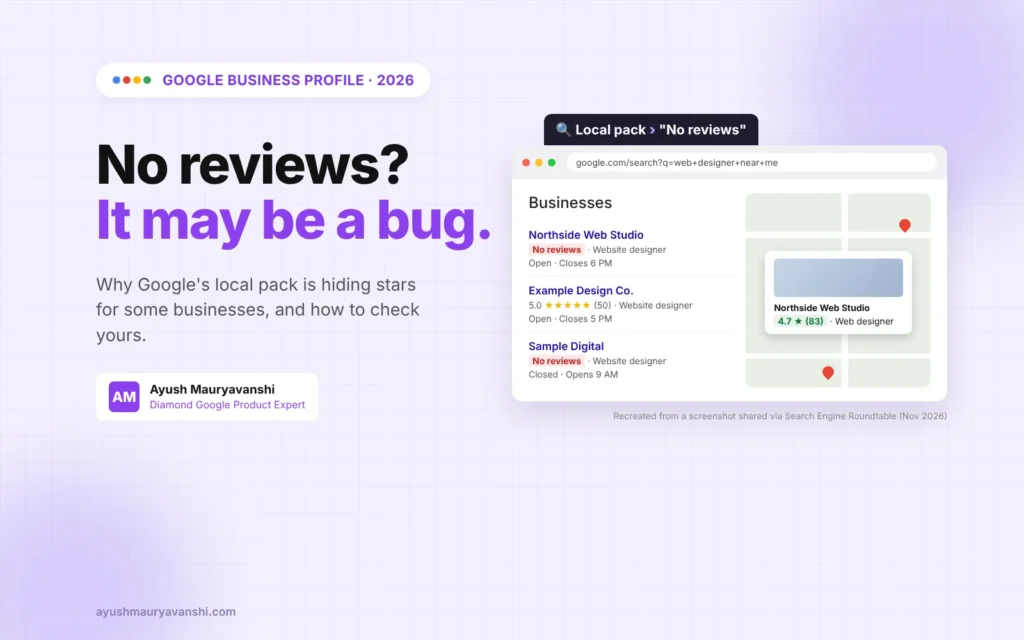
If your Google Business Profile is showing “No reviews” in the local pack, check the listing itself before you panic. Since late November 2026, some businesses that clearly have reviews are showing “No reviews” with no stars in Google’s map pack, while the full profile still shows the real rating. In most of the cases I’ve looked at, nothing was deleted. It’s a display problem on Google’s side.
I’m a Diamond Product Expert in the Google Help Community and work on Google Business Profile issues daily. Review problems are some of the most stressful threads we get, because owners see a zero where years of reviews used to be. This post explains what’s happening, how to tell a display bug from real review loss, and what to do (and not do) while it lasts.
Key takeaways
- Google’s local pack is showing “No reviews” for some businesses that do have reviews. The full profile and Maps still show the real count.
- It was reported on November 26, 2026. Google hasn’t commented publicly yet.
- It’s inconsistent. The same business can show stars on one search and “No reviews” on the next.
- If your review count is still correct in your Business Profile, your reviews haven’t been removed.
- Don’t edit your profile or ask customers to re-post reviews because of this.
What is the Google “No reviews” bug?
In the local pack (the three businesses with a map that show up for searches like “plumber near me”), some listings show the words “No reviews” where the star rating and review count normally sit. Click the same business and the profile panel shows the correct stars and count.
Barry Schwartz at Search Engine Roundtable reported it on November 26, 2026 after it was spotted by Syed Amir. His own example: his company’s listing said “No reviews” in the local pack, while the map card for the same business showed a 4.7 rating from 83 reviews.
A few details matter here:
- It doesn’t hit every business. Two listings in the same pack can behave differently.
- It comes and goes. Reviews show on one search and disappear on the next.
- It can depend on whether you’re signed in and which browser you use.
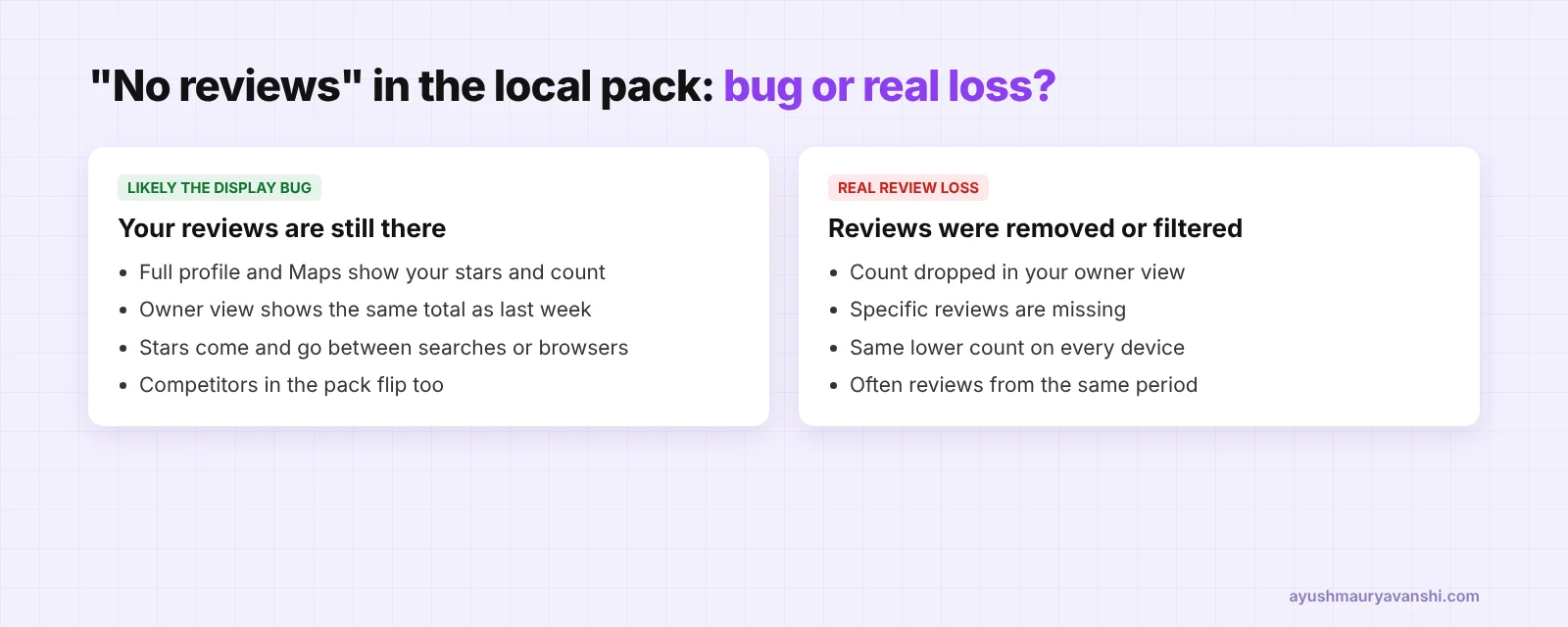
That pattern is what a display bug looks like. When reviews are actually removed, the count drops everywhere and stays down.
Is my Google Business Profile showing no reviews because of the bug?
Run these checks in order. They take five minutes.
- Open the full profile. Click your business in the local pack, or search your exact business name. If the profile panel shows your stars and count, the reviews are there.
- Check Google Maps. Open the Maps app and search your business. If Maps shows your stars and count, the reviews are still on your profile.
- Check your Business Profile as the owner. Signed in as an owner or manager, open Read reviews from your profile. The total there is the number that matters.
- Try a private window and a second browser. If one shows stars and the other shows “No reviews”, that’s the bug, not your profile.
- Compare with competitors. If other businesses in the same pack also flip between stars and “No reviews”, it’s not something you did.
If all five checks show your reviews, you’re looking at the display problem. If your owner view shows a lower count than last week, or specific reviews are gone, that’s a different issue.
How is this different from reviews actually disappearing?
Real review loss has a different shape:
- The count drops in your owner view, not just in the local pack.
- Specific reviews are missing, often from the same period or from customers with new accounts.
- It stays that way on every device and browser.
Reviews get removed for policy reasons, for spam filtering, or because the reviewer deleted their account. If that’s what you’re seeing, my guide on Google reviews disappearing covers the causes and what you can and can’t recover.
Why does “No reviews” in the local pack matter?
The local pack is where most people choose who to call. A row of stars next to your competitors and “No reviews” next to you looks like a new or untrusted business, even if you have hundreds of reviews.
So yes, it can cost clicks while it lasts. But it isn’t a penalty, and it isn’t a sign your profile is in trouble. Nothing in the bug reports points to it affecting rankings. It affects what people see next to your name.
What should you do while the bug is live?
- Document it. Take a dated screenshot of the local pack showing “No reviews” next to a screenshot of your profile showing the real count. If you need to contact support, this saves a lot of back and forth.
- Report it. Use the Send feedback link at the bottom of the search results page and describe what you see. You can also contact Google Business Profile support from your profile’s help menu.
- Keep asking for reviews as normal. New reviews still count and still show on your profile.
- Check again in a few days. Display bugs like this usually get fixed without any action from owners.
What you shouldn’t do
This is where I see owners make things worse:
- Don’t edit your profile to “refresh” it. Changing the name, category or address won’t bring the stars back and can send the profile into review or re-verification.
- Don’t ask customers to post their reviews again. Duplicate reviews from the same people get filtered, and a sudden burst of reviews can look like manipulation.
- Don’t buy reviews or use review gating to “fix” the count. That’s the fastest way to get real reviews removed and a warning on your profile.
- Don’t create a new profile. A new profile won’t have your reviews and will likely be flagged as a duplicate.
When should you get help?
If your owner view shows the right count and the problem is only in the local pack, wait it out. If your count has actually dropped, a review you rely on has disappeared, or your profile shows a warning about review policy, that needs a closer look. For fake or unfair reviews you want removed, my guide to Google review appeals walks through the current process.
Frequently asked questions
Why does my Google Business Profile show no reviews?
If the local pack shows “No reviews” but your full profile shows your rating, it’s most likely the display bug reported in November 2026. If the count is also zero in your owner view, your reviews may have been removed or filtered.
Did Google delete my reviews?
Not if your Business Profile still shows the correct count when you sign in as the owner. The local pack bug only affects what’s shown in search results, not the reviews themselves.
Does the no reviews bug affect my ranking?
Nothing reported so far shows a ranking effect. It changes what searchers see next to your listing, which can lower clicks while it lasts.
How do I report the bug to Google?
Use Send feedback at the bottom of the Google search results page with a screenshot, or contact Google Business Profile support from your profile. A dated screenshot of both views helps.
Should I ask customers to leave their reviews again?
No. Duplicate reviews get filtered and a sudden spike can trigger review spam checks. Keep collecting new reviews from new customers as usual.
How long will the no reviews bug last?
Google hasn’t said. Display bugs in the local pack are usually fixed within days or weeks without owners doing anything.
Still not sure what you’re seeing?
If you can’t tell whether this is the bug or real review loss, send me a screenshot of your local pack and your owner view. I look at review cases every day and can usually tell you in a few minutes. Message me on WhatsApp or see my local SEO service.