
On this page
- Google Business Profile Facebook Messenger: what changed
- How to add Facebook Messenger to your Google Business Profile
- How to find your m.me link
- Google added an m.me link I didn’t ask for. What now?
- WhatsApp, text message or Messenger: which chat option to pick
- Common mistakes I see with chat links
- Does a Messenger or WhatsApp button help rankings?
- What to do now
- Frequently asked questions
- How do I add Facebook Messenger to my Google Business Profile?
- Why did Google add a Facebook Messenger link to my profile automatically?
- How do I remove the Messenger link from my Google Business Profile?
- Can I add WhatsApp and Facebook Messenger at the same time?
- Does a chat button improve my Google Maps ranking?
- Why isn’t the Chat option showing on my Business Profile?
- Need a hand?
Google Business Profile Facebook Messenger support is here: you can now add Messenger as a chat option, right next to WhatsApp and text messaging. You add it from Edit profile, then Contact, then Chat, and pick Messenger from the drop-down. If Google already added an m.me link to your profile by email in the last few weeks, check it, because an automatic link is only as good as the Facebook Page it points to.
I’m a Diamond Product Expert in the Google Help Community and work on Google Business Profile issues every week. The m.me emails started a small wave of “did I do this?” questions from owners in late October. Now that the option is in the dashboard, here’s how it works, what to check, and when Messenger is the wrong choice.
Google Business Profile Facebook Messenger: what changed
There are two separate changes, about three weeks apart.
Late October 2026: automatic m.me links. Google started emailing owners to say it had added a Facebook Messenger m.me link to their profile. Search Engine Roundtable reported the emails on October 28. An m.me link is Meta’s short link that opens a Messenger chat with a Facebook Page. Owners didn’t request it. Google matched it to the business on its own.
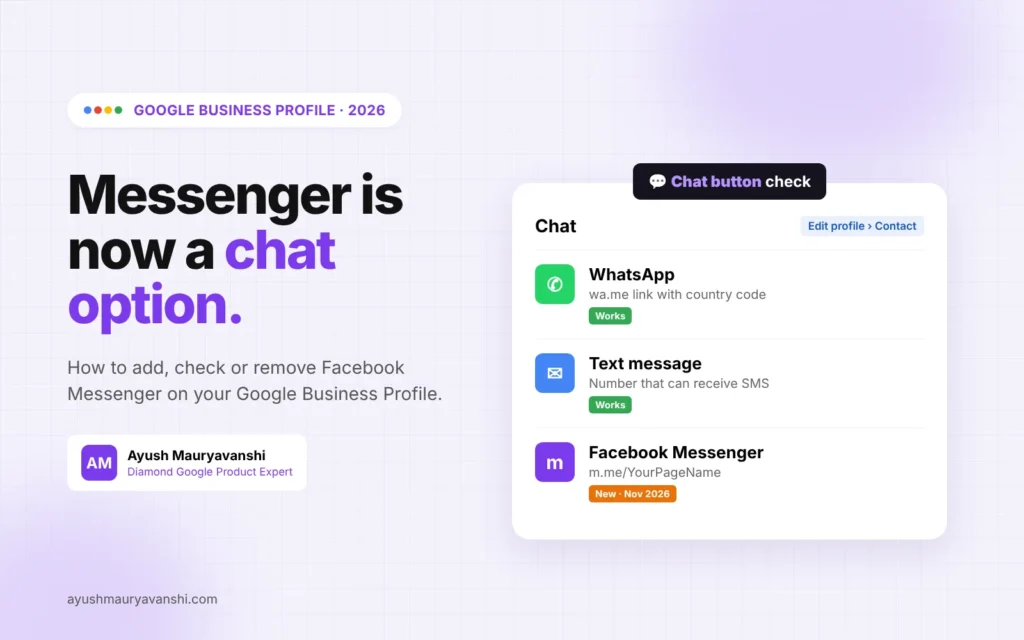
Mid-November 2026: a manual Messenger option. Around November 16, Messenger started appearing as a choice under Chat when you edit your profile. So now you can add, change or remove it yourself instead of waiting for Google to do it.
Google’s own help page for chat options still only names WhatsApp and text message at the time I’m writing this. Expect that page to catch up. Until then, treat Messenger as rolling out, not something every profile will see on the same day.
How to add Facebook Messenger to your Google Business Profile
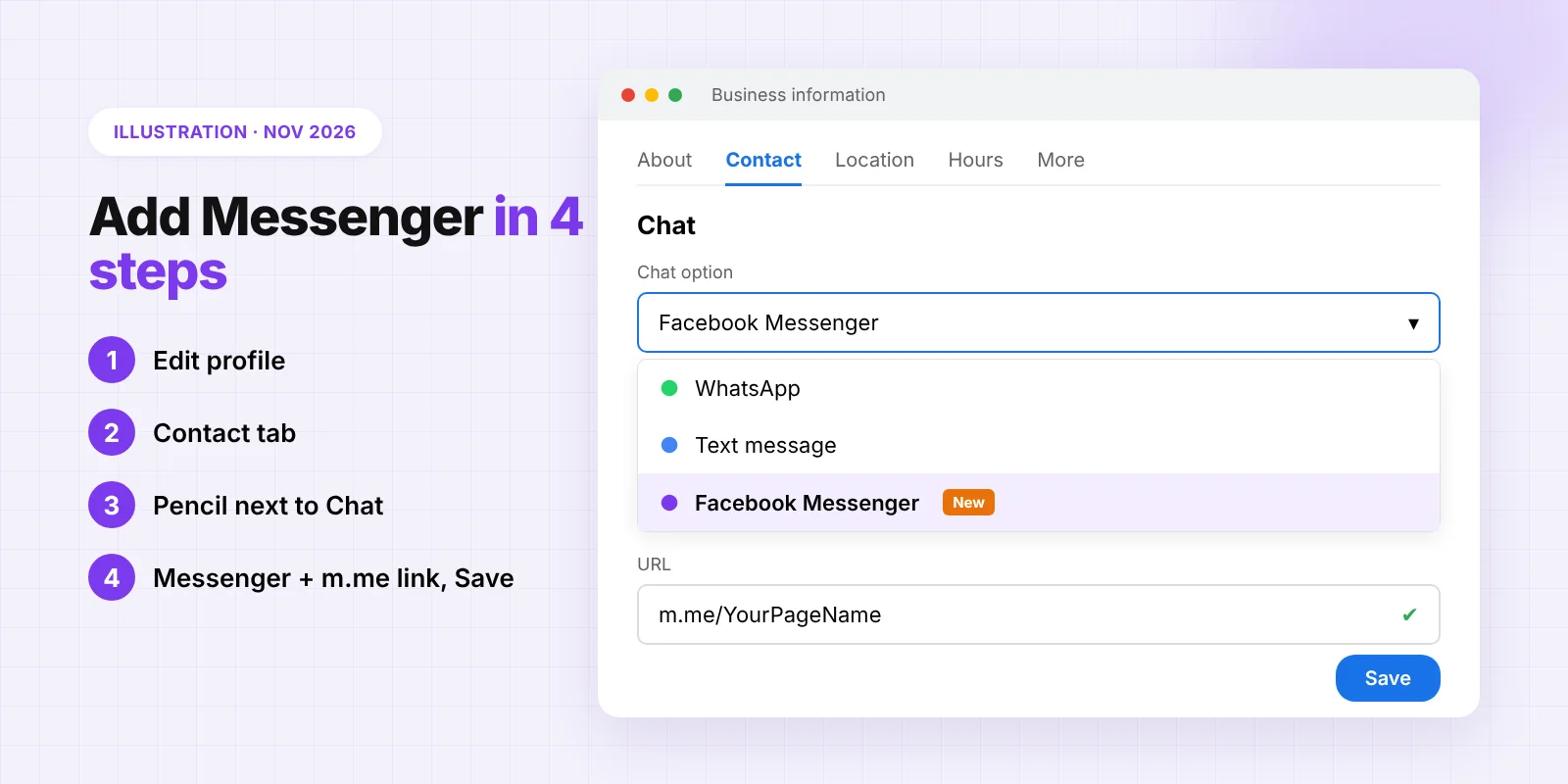
- Sign in to the Google account that manages the profile and search your business name, or open it in Google Maps.
- Click Edit profile, then open the Contact tab.
- Next to Chat, click the edit pencil.
- Open the drop-down and choose Facebook Messenger. You’ll also see WhatsApp and Text message here in most regions.
- Paste your m.me link, which looks like m.me/YourPageName. Use your Facebook Page username, not your personal profile.
- Click Save.
Like most contact edits, the change can take a short while to show on Search and Maps. If it doesn’t show after a day or two, open the profile again and check whether the edit is still “under review”.
How to find your m.me link
Open your Facebook Page and look at the URL. If it’s facebook.com/sharmadental, your Messenger link is m.me/sharmadental. If your Page only has a long numeric ID, set a Page username first in Facebook’s Page settings. A clean username is easier to check and less likely to break.
Before saving, paste the link into a private browser window. It should open a Messenger chat with your business Page, not your personal Facebook account, and not a “content isn’t available” screen.
Google added an m.me link I didn’t ask for. What now?
Don’t panic. This one isn’t a policy problem and it won’t get you suspended. But do check three things:
- Is it your Page? I’ve seen Google match the wrong entity before with other auto-added details, like booking links from providers the owner never used. Click the link and confirm it opens your Page.
- Is anyone reading that inbox? A lot of small businesses have a Facebook Page they set up years ago and never open. If messages land there and nobody replies, the button hurts you more than it helps.
- Is it the channel you want? If your customers mostly use WhatsApp, Messenger may be the wrong default.
If any answer is no, go to Edit profile, Contact, Chat, and either replace the link or remove it. Then keep an eye on the profile for a week. Google sometimes re-applies data it pulled from elsewhere, the same way it does with other Google Business Profile edits you didn’t make.
WhatsApp, text message or Messenger: which chat option to pick
You can only realistically run one main chat button, so pick the one your customers already use.
- WhatsApp is the obvious pick in India, the Middle East, much of Europe and Latin America. Use a wa.me click-to-chat link with your full number including country code.
- Text message works best in the US and Canada, where people text businesses by default. The number has to be able to receive SMS. A landline usually can’t.
- Facebook Messenger makes sense if your Page is active and you already answer Messenger chats quickly, for example restaurants, salons and local shops that run on Facebook.
One detail from Google’s help page matters here: if you add both WhatsApp and a text message number, only the text option is shown to customers. Google hasn’t said how Messenger fits into that order yet, so don’t assume all three will appear. Pick one and test what customers actually see.
Common mistakes I see with chat links
- Personal profile instead of a Page. m.me links to personal accounts mix customer chats with your private messages. Use the business Page.
- Wrong WhatsApp format. Links missing the country code, or a number with spaces and a plus sign inside the link, often fail. wa.me/919876543210 style works.
- Nobody monitoring. A chat button that gets no reply for two days is worse than no chat button. Set up notifications on your phone before you add it.
- Changing everything at once. If you’re also changing your phone number, address or name, space the edits out. Several contact changes in one go is one of the patterns I see before verification requests. My guide on changing your Google Business Profile phone number safely covers how I sequence those edits.
Does a Messenger or WhatsApp button help rankings?
I haven’t seen any evidence that adding a chat option moves a profile up in local rankings, and Google hasn’t said it does. What it can do is turn more profile views into conversations. Google shows chat clicks in your Business Profile performance metrics, so you can see after a few weeks whether customers actually use it.
If rankings are the real goal, focus on the basics: correct category, real reviews, accurate hours and a profile that matches your website. That’s the work behind my local SEO service.
What to do now
- Open your profile, go to Edit profile, Contact, Chat, and see what’s there today.
- If Google added an m.me link, click it and confirm it opens your own Facebook Page.
- Decide on one main chat channel based on how your customers already contact you.
- Turn on notifications for that channel so replies happen within hours, not days.
- Check chat clicks in your performance report after 30 days and keep or change the channel.
Frequently asked questions
How do I add Facebook Messenger to my Google Business Profile?
Click Edit profile, open Contact, click the pencil next to Chat, choose Facebook Messenger from the drop-down and paste your m.me link, for example m.me/YourPageName. Then click Save. The option is still rolling out, so some profiles may only see WhatsApp and Text message for now.
Why did Google add a Facebook Messenger link to my profile automatically?
Since late October 2026, Google has been emailing some owners to say it added a Messenger m.me link it matched to their business. You didn’t do anything wrong. Check that the link opens your own Facebook Page and remove or replace it if it doesn’t.
How do I remove the Messenger link from my Google Business Profile?
Go to Edit profile, Contact, then the pencil next to Chat. Delete the Messenger link or switch the chat option to WhatsApp or Text message, then Save. Check again after a week in case Google re-applies it.
Can I add WhatsApp and Facebook Messenger at the same time?
You can try, but don’t count on both showing. Google’s help page says that when both WhatsApp and text message are added, only text message is shown. It hasn’t confirmed how Messenger is prioritised, so choose one main chat channel.
Does a chat button improve my Google Maps ranking?
I haven’t seen evidence of that, and Google hasn’t said so. A chat button helps conversions, not rankings. Track chat clicks in your performance report to see if customers use it.
Why isn’t the Chat option showing on my Business Profile?
Google says chat options are only available in select regions. The profile also needs to be claimed and verified. If you see no Chat field at all, your profile or region may not have it yet.
Need a hand?
If an auto-added link points to the wrong business, or your contact edits keep getting stuck in review, send me a message on WhatsApp with your profile link and I’ll take a look. If your profile isn’t verified yet, start with Google Business Profile verification, because chat options only work on verified profiles.