
On this page
- Key takeaways
- What is the ChatGPT business directory?
- Is ChatGPT for business directory the same as the GPT Store or ChatGPT Business plan?
- Who can list their business on ChatGPT?
- How do you register your business on ChatGPT?
- How do you verify your business on ChatGPT?
- What can you edit on your ChatGPT business profile?
- What do ChatGPT Business Hub insights show?
- Does claiming your business help you rank in ChatGPT?
- How do you get your business recommended by ChatGPT?
- What are Business Agents in ChatGPT?
- What to do now
- Frequently asked questions
- What is the ChatGPT business directory?
- How do I add my business to ChatGPT?
- Is it free to list a business on ChatGPT?
- Can businesses outside the U.S. claim a ChatGPT listing?
- Will claiming my business make ChatGPT recommend it more?
- How do I get the verified badge on ChatGPT?
- What if someone else already claimed my business on ChatGPT?
- Want help getting your business ready for ChatGPT and Google?
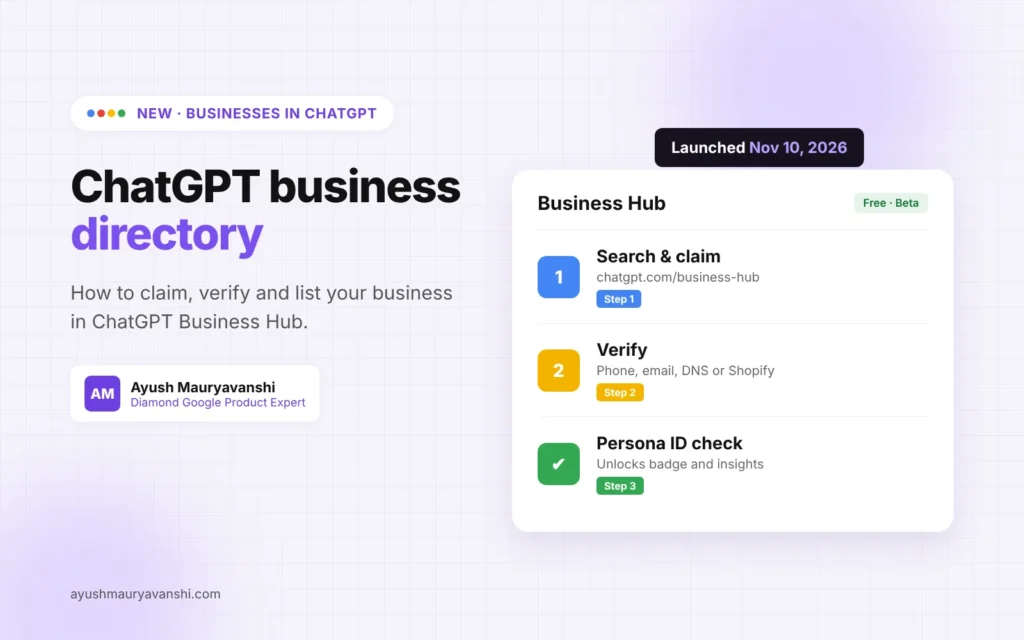
The ChatGPT business directory is OpenAI’s new Businesses in ChatGPT feature, launched in beta on November 10, 2026. Through Business Hub, you can claim your business in ChatGPT, verify it, update your details, add products and see how often ChatGPT mentions you. It’s free to claim, and it works for online businesses and, for now, local businesses with an existing U.S. listing.
I’m a Diamond Product Expert in the Google Help Community and I work on Google Business Profile listings every week. For years, Google has been the only place where a business could claim a listing that shows up when people ask “who should I call?” ChatGPT now has its own version, and many business owners are asking me how to get on it. I’ve gone through Business Hub myself, and this guide covers what it is, who can claim, the exact steps to register, and how to make the most of it.
Last updated: November 12, 2026
Key takeaways
- Businesses in ChatGPT, managed through Business Hub at chatgpt.com/business-hub, lets owners claim and manage how their business appears in ChatGPT.
- Verification works by business phone, business email, website domain (DNS) or Shopify, followed by identity verification with Persona.
- Online businesses can claim or add a listing where ChatGPT is available. Local stores and restaurants can currently claim only an existing U.S. listing.
- Insights show mentions, website clicks and discovery topics for the past 28 days.
- Claiming doesn’t guarantee more visibility. OpenAI says advertising doesn’t influence ChatGPT’s independent answers.
What is the ChatGPT business directory?
The ChatGPT business directory is the set of business profiles ChatGPT shows when a business appears in an answer. OpenAI calls the feature Businesses in ChatGPT, and the dashboard where owners manage it is called Business Hub. When ChatGPT mentions your business, people can click through to your ChatGPT profile.
In its launch announcement, OpenAI says businesses can claim their business, manage their information and see insights on how people engage with them in ChatGPT. OpenAI puts ChatGPT’s audience at 1.2 billion people a week, which is why this matters even if you’ve never thought about “AI search” before.
There are three parts to it:
- Business profiles. Your name, website, description, category, logo, cover photo and policies.
- Business Hub. The dashboard for claiming, editing, product feeds and insights.
- Business Agents. An optional chat assistant that answers customer questions about your products, currently for eligible U.S. ecommerce and online service businesses.
Is ChatGPT for business directory the same as the GPT Store or ChatGPT Business plan?
No. People search for this in many ways, “ChatGPT for business directory”, “GPT directory for business”, “ChatGPT business listing”, but they’re often mixing up three different things:
| Name | What it is | Is it the business directory? |
|---|---|---|
| Businesses in ChatGPT (Business Hub) | Free business profiles you claim and manage | Yes |
| GPT Store | A library of custom GPTs people build | No |
| ChatGPT Business plan | A paid workspace plan for teams | No |
If your goal is to have your business show up correctly when people ask ChatGPT for a recommendation, Business Hub is the one you want. Building a custom GPT does not create a business listing.
Who can list their business on ChatGPT?
According to OpenAI’s help article on setting up your business on ChatGPT, you can claim a business if you own it or are authorized to represent it. You don’t need an ads account or an Enterprise agreement.
What you can do depends on the business type and location:
| Business type | What you can do right now |
|---|---|
| Online business with a website | Claim an existing listing or, if eligible, add a new one where ChatGPT is available |
| Local store or restaurant in the U.S. | Claim an existing U.S. listing only |
| Local business outside the U.S. | Not yet available as a local listing (OpenAI says it will expand to more markets over time) |
| Shopify merchant | Connect your store from Business Hub or the Shopify admin to speed up verification |
| Multi-location brand | Each location is claimed separately; central management isn’t available yet |
| Enterprise customers and advertisers | Work with an OpenAI representative |
For business owners in India and other countries: if you run an online business, a service with a website, or an ecommerce store, you can already try to claim or add it. If you run a physical shop or clinic outside the U.S., keep an eye on Business Hub, because local listings are U.S.-only for now.
How do you register your business on ChatGPT?
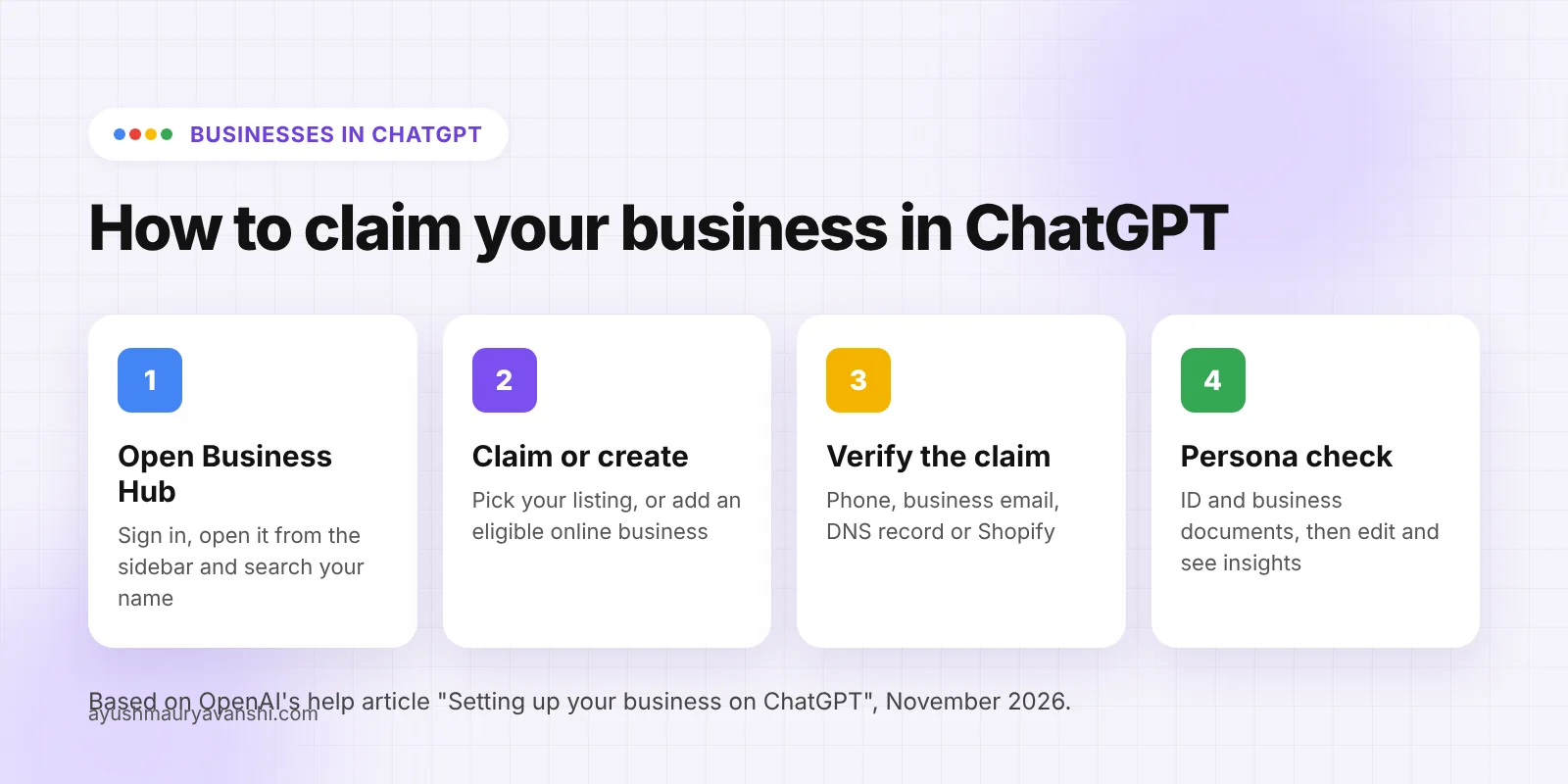
Here is the full process to claim or add your business in ChatGPT Business Hub, step by step:
- Sign in to ChatGPT with the account you want to manage the business from. Use a business-owned account, not a personal one you might lose.
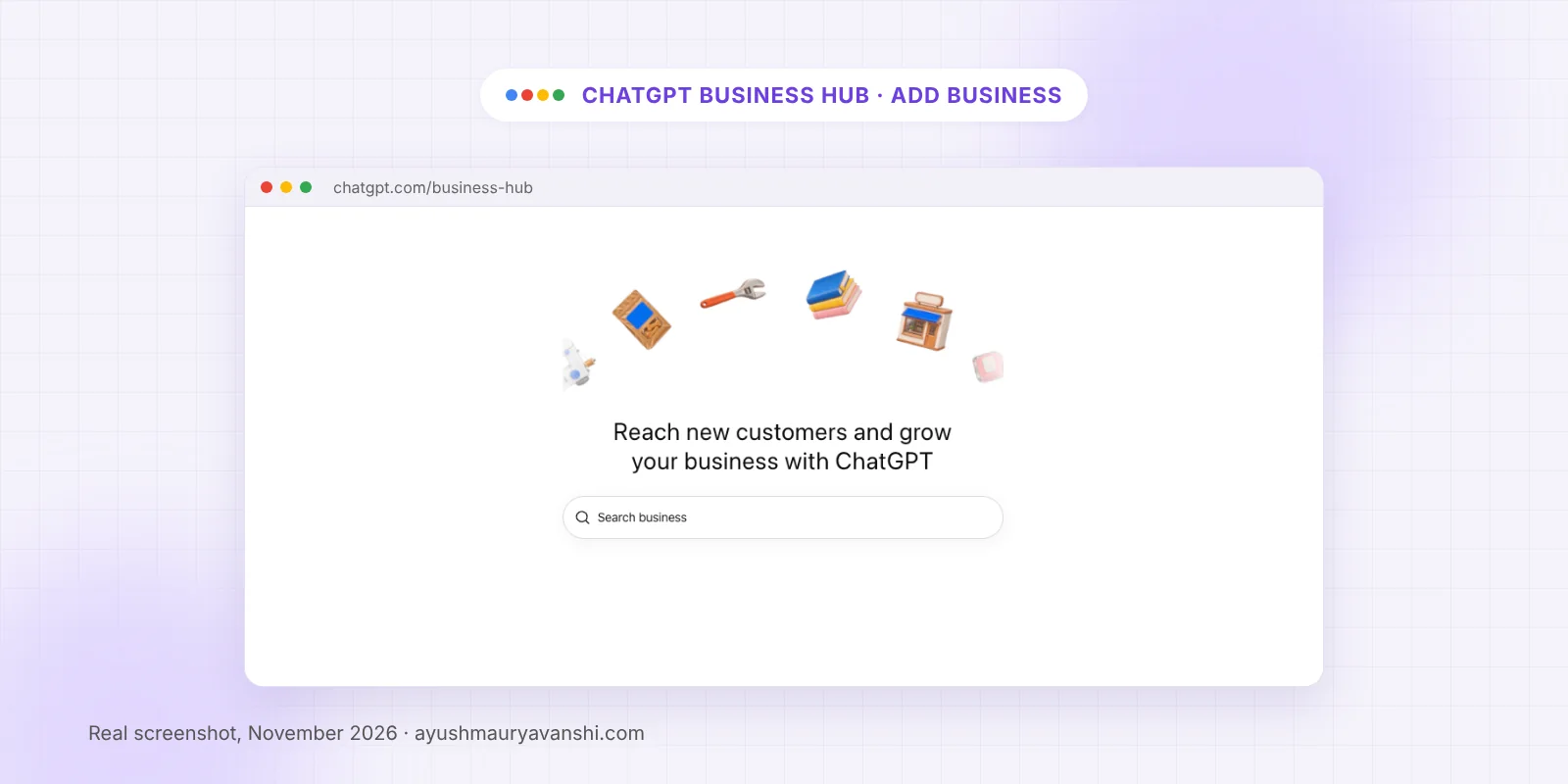
- Open Business Hub from the sidebar, or go to chatgpt.com/business-hub.
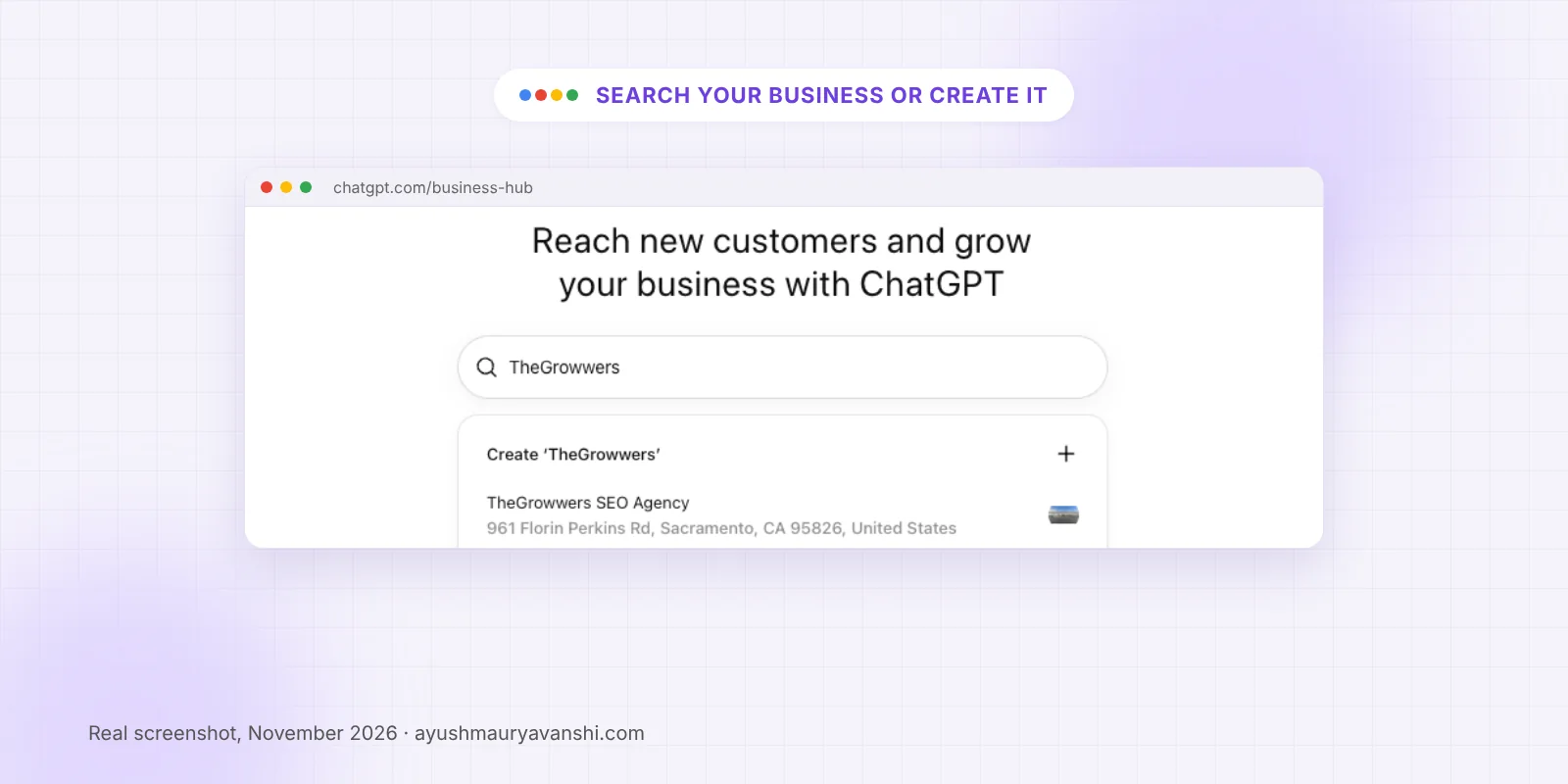
- Select Add, then search for your business by name.
- Select the listing that matches your business. If it doesn’t exist and you run an eligible online business, choose the Create option to add it.
- Choose a verification method and follow the prompts (details in the next section).
- Wait for OpenAI to approve the claim. You’ll get an email with the decision or a request for more information.
- Complete identity verification with Persona so you can publish changes, see insights and get the blue verified badge.
- Update your profile and, if you sell products, connect a product feed.
When you search, you’ll see existing listings that ChatGPT already has, plus a Create option. Pick the existing listing if it’s yours. Creating a second one for a business that already has a listing only splits your information.
If you see Contact support instead of a claim button, the listing is locked, and you’ll need to request access through support.
How do you verify your business on ChatGPT?
OpenAI offers four ways to verify a claim. You’ll see the ones available for your business:
- Business phone. Get a code by text message or an automated call to the number on the listing.
- Business email. Get a code at the email address associated with your business.
- Website domain. Add a TXT record to your domain’s DNS, then select Verify domain. Copy the type, host and value exactly. DNS changes can take time to show.
- Shopify store. Connect Shopify and sign in to the store you’re claiming.
In my experience, domain verification is the most reliable if you have access to your DNS (Cloudflare, GoDaddy, Hostinger and so on). If your web developer or agency manages the domain, send them the TXT record rather than sharing your login.
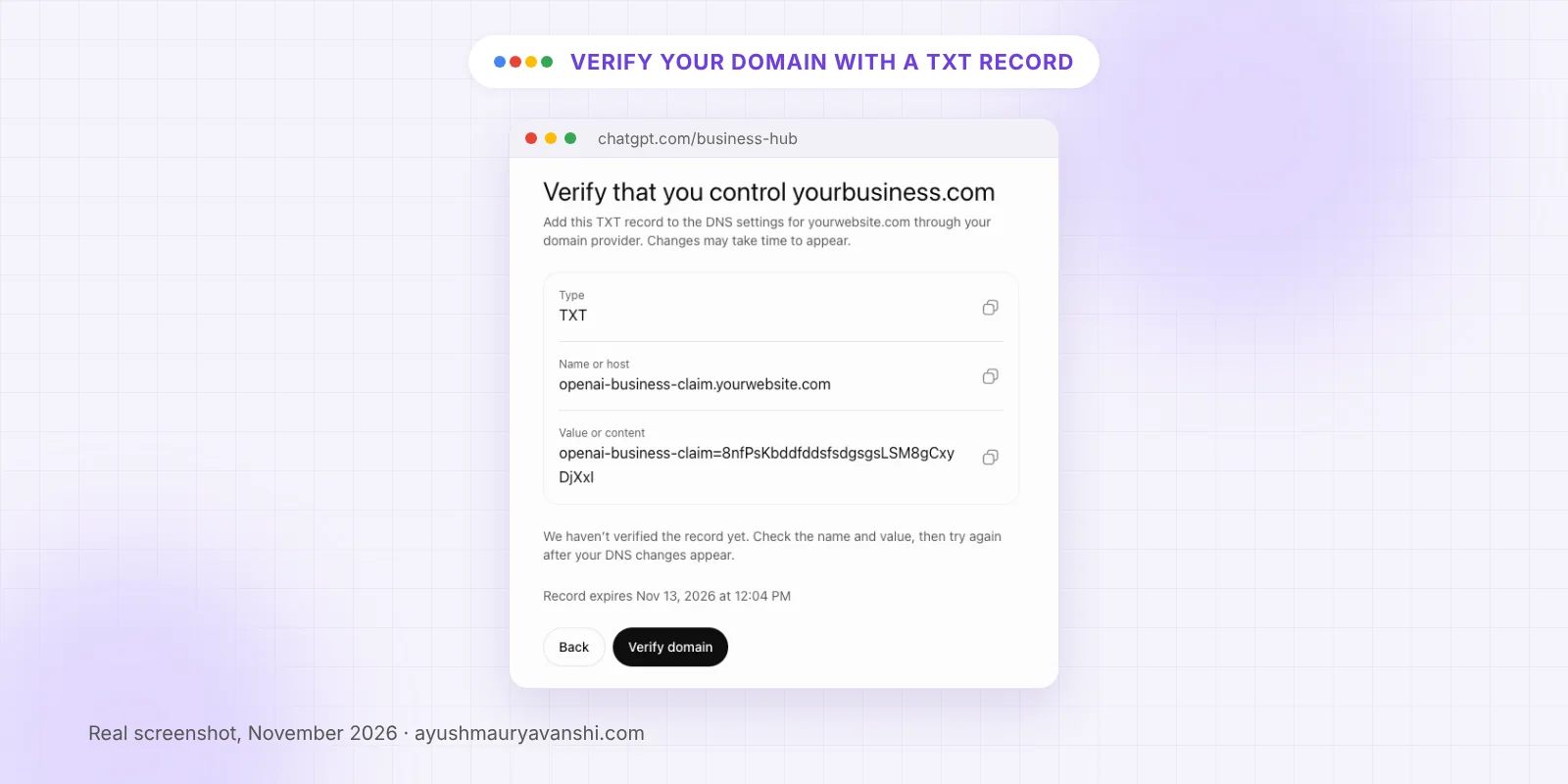
The screen shows the exact type, name or host, and value to copy, plus an expiry time for the record. Add it before it expires, then come back and select Verify domain. If you see “We haven’t verified the record yet”, the DNS change usually just hasn’t spread yet, so wait and try again rather than adding a second record.
After the claim is approved, there’s a second step: identity verification with Persona. OpenAI says you may need a government-issued ID, business registration information and proof that you’re authorized to represent the business. Make sure the business name, address and registration or tax number match your official records. Mismatches are the main reason verifications fail, exactly like on Google Business Profile.
What can you edit on your ChatGPT business profile?
Once your claim and Persona verification are approved, you can update:
- Website
- Business description
- Product or service category
- Logo and cover photo
- Delivery policy and return policy
- Other optional details
- Products, prices and availability through a product feed (CSV, a hosted feed URL, or Shopify)
OpenAI reviews changes before they go live, and updates can take time to appear in a listing or answer. ChatGPT may also use other sources about your business, so your website and other listings still matter.
What do ChatGPT Business Hub insights show?
Business Hub’s Insights tab shows activity for the past 28 days:
| Metric | What it means |
|---|---|
| Mentions | Online business: ChatGPT referenced your website (your brand name alone doesn’t count). Local business: ChatGPT showed a result for your location |
| Website clicks | How often people clicked through to your website |
| Discovery topics | Common themes in answers that mentioned or cited your business |
OpenAI doesn’t share individual prompts or conversations. A blank metric doesn’t necessarily mean zero activity; it can mean you haven’t reached the reporting threshold yet. This is the first time any AI assistant has given businesses this kind of data, and for agencies like mine it’s a useful new signal next to Google Search Console and Business Profile performance.
Does claiming your business help you rank in ChatGPT?
Not directly. OpenAI’s help article says claiming lets you manage the information you provide, but it doesn’t guarantee more visibility or give you control over ChatGPT’s independent recommendations. It also says advertising doesn’t influence ChatGPT’s independent answers.
What claiming does do is make sure the information ChatGPT has about you is accurate and current: the right website, the right description, the right products and prices. That matters, because a wrong or outdated listing can send customers to the wrong place.
How do you get your business recommended by ChatGPT?
Nobody outside OpenAI knows exactly how ChatGPT picks businesses, so be careful of anyone selling “guaranteed ChatGPT rankings.” What I’d focus on is the same foundation that works for Google:
- Claim and verify your Business Hub profile so your core details are accurate.
- Keep your website clear and specific. Say what you do, where, for whom and at what price range, in plain words.
- Keep your details consistent everywhere. Same name, address, phone and website across your website, Google Business Profile and other listings. My local SEO service covers exactly this.
- Earn real reviews and mentions. ChatGPT may draw on other sources, so your reputation across the web matters.
- Keep your Google Business Profile strong. It’s still the biggest source of local discovery, and the work overlaps. If your profile is suspended or unverified, fix that first with my GBP reinstatement or verification help.
- Add a product feed if you sell online, so prices and availability are accurate.
What are Business Agents in ChatGPT?
A Business Agent is an optional assistant that answers customer questions using the information you provide, such as product details and your return policy. When ChatGPT shows your profile, a customer can choose to start a separate, clearly labeled chat with your agent.
Right now, Business Agents are available to eligible ecommerce and online service businesses in the U.S. with a website, and the business must meet OpenAI’s Business Agents Policy. The agent can explain products and policies and link to your website, but it can’t complete purchases, make bookings or check orders. Businesses can also sponsor their agent with ChatGPT Ads, and OpenAI says sponsored placements are clearly labeled.
What to do now
- Open chatgpt.com/business-hub and search for your business.
- If a listing exists, claim it before anyone else does. If it doesn’t and you’re an eligible online business, add it.
- Verify with your domain, business email, phone or Shopify.
- Complete Persona identity verification with documents that match your official records.
- Fill in your website, description, category, logo, cover photo and policies.
- Connect a product feed if you sell products.
- Check Insights monthly alongside your Google data.
- Keep your Google Business Profile and website consistent with your ChatGPT profile.
Frequently asked questions
What is the ChatGPT business directory?
The ChatGPT business directory refers to Businesses in ChatGPT, an OpenAI feature launched in beta on November 10, 2026. Businesses can claim a profile through Business Hub, keep their details current, add products and see insights such as mentions and website clicks in ChatGPT.
How do I add my business to ChatGPT?
Sign in to ChatGPT, open Business Hub from the sidebar or at chatgpt.com/business-hub, search for your business and select your listing. Verify by business phone, business email, website domain or Shopify, wait for approval, then complete identity verification with Persona. Eligible online businesses can add a new listing if none exists.
Is it free to list a business on ChatGPT?
Yes. You don’t need an ads account or an Enterprise agreement to claim an eligible business. Claiming, publishing a Business Agent and advertising are separate. ChatGPT Ads are optional and paid, and OpenAI says advertising doesn’t influence ChatGPT’s independent answers.
Can businesses outside the U.S. claim a ChatGPT listing?
Eligible online businesses can claim or add a listing where ChatGPT is available and the required verification is supported. Local stores and restaurants can currently claim only an existing U.S. listing. OpenAI says it plans to expand to more markets and categories over time.
Will claiming my business make ChatGPT recommend it more?
No guarantee. OpenAI says claiming lets you manage the information you provide, but it doesn’t guarantee more visibility or control over ChatGPT’s independent recommendations. It does help ChatGPT show accurate details, such as your website, description, category and products.
How do I get the verified badge on ChatGPT?
The blue verified badge appears after your identity verification with Persona is approved. Claiming the business on its own doesn’t add the badge. You may need a government-issued ID, business registration details and proof that you’re authorized to represent the business.
What if someone else already claimed my business on ChatGPT?
Open the business profile in Business Hub, select the more options menu, then Dispute ownership. You’ll verify with Persona that you’re authorized to represent the business. OpenAI says claiming or disputing ownership doesn’t change the profile’s visibility in ChatGPT.
Want help getting your business ready for ChatGPT and Google?
Claiming a ChatGPT profile takes a few minutes. Making sure your business information is consistent across ChatGPT, Google and your website is where most businesses fall short. If you want a second pair of eyes on your listings, message me on WhatsApp and tell me about your business. I’ll tell you what I’d fix first.